
Lesson 8 of 9 · 28m
INP and the Main Thread
Why taps feel slow, the three phases of an interaction, finding long tasks with Long Animation Frames, and yielding so the browser can paint.
The browser's main thread is a single-lane road. Parsing, style, layout, paint, your event handlers, your framework's re-render, the analytics SDK's batch flush, the chat widget's polling — all in one queue. INP measures what happens when the user needs that lane and something else is in it. When users say a site "feels janky," they are describing a busy main thread, and INP is the first metric that puts a number on it.
Three phases of every interaction
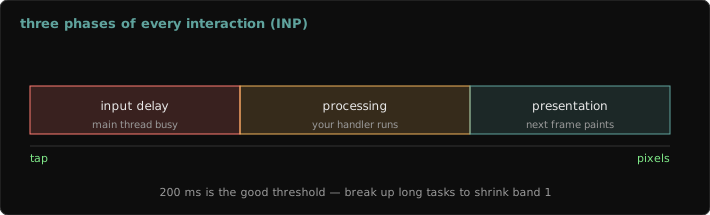
tap ──┬── input delay ──┬── processing (your handlers) ──┬── presentation delay ──┬── next paint
      │ main thread busy │ pointerdown/up, click, input   │ style, layout, paint   │
│ with other work │ handlers + framework render │ of the resulting DOM │- Long input delay → something else was running when the tap arrived: hydration, a third-party script, a timer doing batch work.
- Long processing → your handler (or the re-render it triggers) is too heavy.
- Long presentation delay → the DOM change was huge or forced expensive style/layout — e.g. re-rendering a 5,000-node table.
The web-vitals attribution build reports all three per interaction, so field data tells you which phase to attack before you open a profiler.
Finding the culprit: Long Animation Frames
Long Tasks only tell you that something blocked; the Long Animation Frames API (LoAF) tells you which script:
new PerformanceObserver((list) => {
  for (const frame of list.getEntries()) {
    if (frame.blockingDuration < 100) continue;
    for (const s of frame.scripts) {
      console.log(
        Math.round(s.duration), "ms",
        s.invoker,          // e.g. "BUTTON.onclick" or "TimerHandler:setTimeout"
        s.sourceURL,        // which file — your bundle or a third party
        s.sourceFunctionName
      );
    }
  }
}).observe({ type: "long-animation-frame", buffered: true });Ship a sampled version of this in your RUM. The first time you run it, expect to discover that a third-party script you forgot about is responsible for a large share of your blocking time.
Fix: do less, then yield
The browser can only paint between tasks. A handler that runs 400 ms straight blocks the next frame for 400 ms no matter how you slice the work inside it. The pattern is: do the visible update first, then yield before the rest. This runs in the sandbox:
const yieldToMain = () =>
  globalThis.scheduler?.yield
    ? scheduler.yield()                       // Chrome 129+: resumes ahead of other queued tasks
    : new Promise((r) => setTimeout(r, 0));   // fallback: back of the task queue

async function onApplyFilters(items) {
  console.log("1. update the checkbox + show spinner (cheap, visible)");
  await yieldToMain();                        // let the browser paint that feedback
  const chunks = [];
  for (let i = 0; i < items.length; i += 500) chunks.push(items.slice(i, i + 500));
  let kept = 0;
  for (const chunk of chunks) {
    kept += chunk.filter((n) => n % 3 === 0).length;   // the expensive part, in slices
    await yieldToMain();
  }
  console.log("2. results ready:", kept, "of", items.length);
}

onApplyFilters(Array.from({ length: 5000 }, (_, i) => i));Other fixes, in the order I'd reach for them: debounce input-driven work; avoid re-rendering what didn't change (memoization, virtualization); move pure computation to a Web Worker; defer non-urgent work like analytics with requestIdleCallback; and load third-party scripts after the page is interactive — or not at all.
Field notes
requestAnimationFrameis not yielding — it runs right before the next paint, so heavy work there delays exactly the frame you wanted.- Avoid layout thrash: reading
offsetHeightright after writing styles forces a synchronous layout. Batch all reads, then all writes. - The worst INP is usually on the first interaction during hydration, or on a page with huge DOM (over ~1,500 nodes, style and layout get noticeably expensive).
- Lab INP needs a script that clicks things. Lighthouse timespan mode or a Puppeteer flow will do it; a plain navigation run never will.