
Cloudflare OS: Inside the Open-Source Agent Sandbox
Cloudflare open-sourced its internal AI workspace. A technical breakdown of Dynamic Workers, Gatekeepers, capability-based access, and what it takes to self-host it.

On August 5, 2026, Cloudflare open-sourced Cloudflare OS, the internal platform it built so employees outside engineering could build software with AI agents without anyone's security team losing sleep. The headline pitch is a familiar one: let non-developers vibe code, keep the blast radius near zero. What's underneath it is more interesting than the pitch, and worth an actual read if you run infrastructure for a living.
This piece skips the press-release framing and goes straight at the architecture: how a "Gadget" actually runs, how the permission model works, where the clever engineering lives, and what it costs you to self-host the thing.
Where this came from
Cloudflare's CIO, Sam Rhea, dates the origin story to about six months before launch. A sales team member asked him for API keys, plural, to a dozen production systems and admin access to a deployment pipeline. They'd used AI to design what they called a "SuperApp" for the go-to-market org, and all they needed was broad standing access to make it real. That request became the first of many, and it forced Cloudflare to build a platform fast enough to keep up with what non-engineers could now build, without handing out credentials that would make an auditor cry.
The first version, rolled out company-wide in May 2026, was a browser-based harness running in a container per session. Users ran pre-built skill files, connected to internal systems through MCP servers, and got outputs rendered in a side panel. It worked well enough that thousands of employees used it daily, but two problems showed up fast.
First, every task burned tokens re-running an agent session, even for work that was mostly deterministic and didn't need a model in the loop at all. Second, and more serious: MCP access control tells you which tools an agent can call, not which specific resources it actually read. Once people started sharing workspaces and app outputs with each other, that gap became a real leak vector. An agent could read a sensitive table, turn it into a dashboard, and share the dashboard with someone who never had access to the table in the first place.
The version Cloudflare shipped on GitHub is a full rewrite built to close that gap at the platform level instead of leaving it to whoever built the app.
What a Gadget actually is
Cloudflare OS doesn't give you a fixed set of apps like a normal office suite. Every "file" you create is its own small application, called a Gadget, written by an agent and running in complete isolation from everyone else's Gadgets.
Two new Workers runtime primitives make this possible, built specifically for this project:
- Dynamic Workers load server code on demand into a lightweight V8 isolate instead of a container. Cloudflare says isolates start in a few milliseconds and use only a few megabytes of memory, roughly 100x faster to spin up and 10 to 100x more memory-efficient than a standard container.
- Durable Object Facets give each Gadget its own private SQLite database, separate from the Cloudflare OS runtime that manages it.
Put together, every Gadget you create gets a fully isolated runtime and a fully isolated database, without a dedicated server sitting around idle between requests. That's a meaningfully different cost and security model than "one big multi-tenant database with row-level permissions," which is how most SaaS products actually work under the hood.
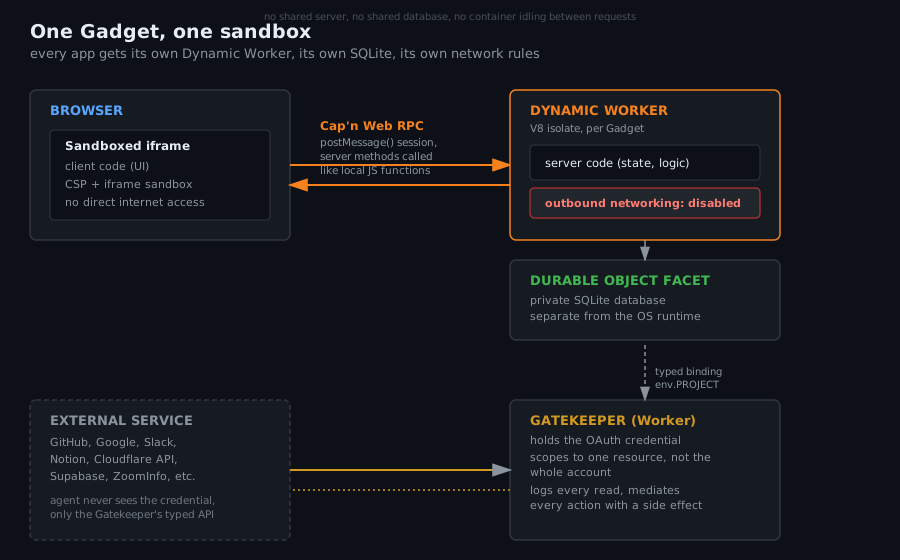
Client and server talk to each other over Cap'n Web, Cloudflare's open-source object-capability RPC system. A server method gets called from the browser like a plain JavaScript function, no schema definitions, no serialization boilerplate. The part worth pausing on: the agent can call the exact same method the human-facing client calls. Build a tool that does your job, and the agent can use that same tool to do the job when you're not around. That's a genuinely different pattern than bolting an MCP wrapper onto an existing API after the fact.
If you're enjoying what you've read so far, we recommend OpenClaw Is Running on Your Machine Right Now. Here's What to Lock Down Before It Eats Your Credentials. as your next read.
Sandboxing without a container per request
The server half of a Gadget runs as a Dynamic Worker with global outbound networking disabled. It cannot reach the internet at all unless you explicitly grant it a capability to do so.
The client half runs inside a sandboxed iframe. It can only talk to its server over a Cap'n Web session tunneled through postMessage() to the parent frame, and Content-Security-Policy plus iframe sandbox attributes block it from reaching the internet directly, to whatever extent a browser can enforce that.
Neither half gets ambient access to anything. That's the load-bearing design decision here, and it's why Kenton Varda, the Cloudflare principal engineer behind the sandbox, was comfortable saying non-technical users could "go wild" without a security team needing to review every generated app individually.
Capability-based access, not access control lists
Every agent and every Gadget starts with access to nothing. If an agent needs to reach a resource, code, it has to ask, and generated code receives that access as a typed binding rather than a raw credential:
const issues = await env.PROJECT.listIssues({
  teamId: "ENG",
  state: "open",
});
env.PROJECT is a capability object representing permission to use one specific resource under one specific policy. The underlying credential never touches the agent or the generated code. This is the same pattern you'd recognize from object-capability security research generally: instead of checking "is this identity on the ACL," the system just never hands out a reference to anything the caller shouldn't be able to use in the first place.
Gatekeepers do the actual mediation
A Gatekeeper is a separate Worker built for one specific external service. It wraps that service's native API behind a clean Cap'n Web interface, handles OAuth, and enforces a scope narrower than "give the agent your whole GitHub account." A Gatekeeper can limit access to a single repo, allow reading issues but not source, mask specific fields, apply rate limits, and require human approval before anything with a side effect, like a merge, actually happens.
The repo ships Gatekeepers for GitHub, Google, the Cloudflare API itself, Supabase, Notion, Confluence, Slack, Spotify, Home Assistant, ZoomInfo, and email. Each one is its own package with its own OAuth setup instructions, and each is architecturally a driver in the OS analogy Cloudflare uses in its own README: workspace backend as kernel, Gatekeepers as device drivers, Gadgets as processes, Blueprints as executables.
Access follows what the agent has actually seen
This is the part that answers the collaboration problem from the v1 rollout. Cloudflare OS logs every resource an agent observes and attaches that observation log to the workspace and to anything it produces. When a second person tries to open a shared Gadget or view its output, the relevant Gatekeeper checks that person's own access to the underlying resources the agent touched, not just whether the Gadget itself was marked shared.
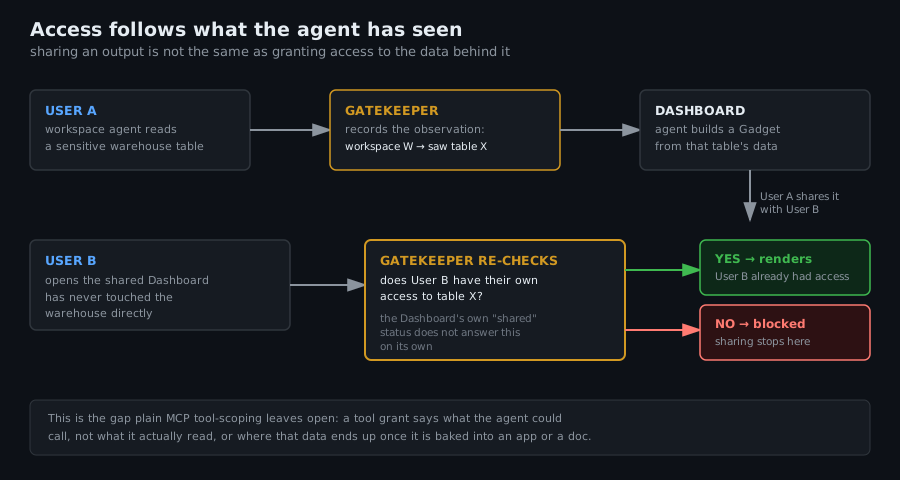
Concretely: if your agent reads a sensitive warehouse table and turns it into a live dashboard, sharing that dashboard with a coworker doesn't quietly hand them the table too. The Gatekeeper re-checks their permissions against the original resource before the dashboard renders anything for them. This closes a confused-deputy problem that plain MCP tool-scoping doesn't solve on its own, since a tool grant tells you what an agent could call, not what it actually read or where that data ended up.
The async approval trick
Human-in-the-loop approval for agent actions usually works synchronously: the agent hits a gate, stops, and waits for a human to click approve before it can continue. In practice this trains people to set --dangerously-skip-permissions and walk away, because nobody wants to babysit an agent through twenty individual approval prompts.
Gatekeepers handle this differently. When an agent performs an action that needs approval, the Gatekeeper simulates the outcome locally and lets the agent keep working as if the action succeeded, queuing the real action for later. If the agent tries to read back results from that action, it gets the simulated result. Once the agent finishes its task, a human reviews the queued actions in bulk, or one at a time, whenever it's convenient, and approves or rejects them. The agent never has to freeze mid-task waiting on a person, and the person never has to choose between babysitting and turning safety checks off entirely.
Model routing and cost control
Every inference call goes through Cloudflare AI Gateway rather than hitting a model provider directly. That gives an org one place to decide which models are even available, route cheaper tasks to cheaper models, and attribute every dollar of inference spend to the person, team, or workspace that generated it. Rhea's post makes the point plainly: you don't need a frontier reasoning model to summarize an inbox every morning, and AI Gateway is where you enforce that instead of hoping people self-police their own token usage. The same gateway lets you reuse existing DLP rules from Cloudflare's Secure Web Gateway to block specific datasets from ever reaching a model provider at all, and to set budgets and rate limits per role.
Still with us? We think you'll like Build Your Own AI Agent Stack: The Complete Self-Hosted Guide for 2026 as your next read.
What self-hosting actually looks like
Two repos ship this. cloudflare-os is the core platform under Apache 2.0. cloudflare-os-starter is Cloudflare's own internal deployment, meant as a template you build on top of the core without patching it, for your own UI, your own Gatekeepers, and your own integrations.
To poke at it locally:
pnpm install
pnpm run-local
Then visit localhost:8787. That runs the whole stack on wrangler and workerd for local testing. It is explicitly not meant for production. For a real deployment, Cloudflare has a hosted flow at os.cloudflare.app/deploy, or you build off the starter repo for anything more customized.
Two caveats worth knowing before you plan a rollout:
It needs a paid Workers plan. Dynamic Workers, the primitive the whole platform depends on, aren't available on the free tier. A GitHub user found this the hard way when their deploy got stopped partway through on a Free plan. Cloudflare updated the deploy flow to surface the requirement up front after the complaint, but it's not spelled out prominently in the docs, so budget for a Workers Paid subscription before you start.
It's early access, by Cloudflare's own admission. The README calls this "a complete rewrite" of v1 with "many rough edges." Cloudflare also isn't accepting outside contributions beyond small, trivially-verified fixes right now, on the reasoning that reviewing AI-generated code is the actual bottleneck today, not writing it. That's a defensible position, but it means you're on your own for anything beyond what ships.
Real production self-hosting on bare workerd, outside Cloudflare's own cloud, is marked "coming soon." The runtime itself is open source, so the architecture isn't permanently tied to Cloudflare as a vendor, but as of this release the practical path to running it is still Cloudflare Workers.
A sanity check on the security claims
"The AI cannot introduce a significant security bug" is a strong claim to put your name on publicly, and Varda did. The architecture backing it up is sound: no ambient authority, disabled outbound networking by default, per-Gadget isolation down to the database, and observation-based re-checks at share time. That's a more rigorous design than most vibe-coding platforms bother with.
It's still worth being skeptical of any absolute claim about sandbox security. Pillar Security published research around the same window on sandbox escapes and boundary bypasses across popular AI coding agents, including Cursor, Codex, Gemini CLI, and Antigravity. No sandbox is proven safe just because the design reasoning is good on paper, and Cloudflare OS v2 is genuinely new code that hasn't had years of adversarial pressure applied to it yet. Treat "go wild, nothing bad will happen" as marketing language layered over a real architecture, not as a guarantee you should stop thinking about.
Is it worth running
If you're already deep in the Workers ecosystem, or you've been looking for a way to let non-technical staff build internal tools without handing out API keys to your CRM, Cloudflare OS is a legitimately interesting piece of infrastructure to study, even before you decide whether to deploy it. The capability-based access model and the observation-log approach to authorization are worth stealing ideas from regardless of whether you ever run the platform itself.
For a homelab or small self-hosted setup, it's overkill today. You need a paid Workers plan, you're locked into Cloudflare's platform in practice even though the runtime is open, and the project is explicit about being unfinished. Watch it. Don't bet a production workflow on it yet.
Internally, Cloudflare's own numbers give a sense of what this looks like at scale once it matures: their sales org reportedly saved over 10,000 hours in a single month on manual work like territory planning and proposal drafting, and users created more than 4,000 apps in 30 days. Their AI-driven engineering code reviewer, built on the same context-and-skills philosophy, flagged close to a quarter million standards deviations and blocked 16,000 merges over four months. Whatever you think of the marketing, that's not nothing.